Build agents, not infrastructure. One MCP server gives them resolved company profiles, your portfolio beside the global market, and matching with a source behind every result, on a data layer kept separate for each customer.
Each end customer's portfolio, projects and answers sit in their own isolated layer, never mixed with another's. You serve every customer from one agent without writing tenancy code.
Requirements, candidates, evaluations and replies are stored together as one project your agent can reopen. The next agent, or a colleague, picks up exactly where the last one stopped.
Every value carries a Matchory ID, the source it came from and the day it arrived. Your agent never merges two companies by name, and never passes on a claim nobody can check.
The job: a CNC-machined aluminium housing, made to a drawing, and a shortlist of suppliers who have answered your information request. Seven steps take your agent from that prompt to the shortlist — each one a tool call, and each one storing what it found in a project: the requirements, the candidates, the evidence, the contacts and the answers. No database to design, no crawler to run, no index to keep current. You ship the agent sooner, one step in the whole run is billed, and every result arrives with its source.
A shortlist only means something if everyone on it can actually make the part. The drawing, the material spec and the certificates it has to hold go in as files and come back as nine requirements — a list you can re-run, hand to a colleague, and check companies against.
The cheapest supplier is one you already have, so the nine requirements run over your own 412 suppliers first — in seconds, at no cost. Then the market: one keyword gives you the countries that make this part, what it costs there and what the risks are, your closest match gives you companies that already resemble it, and the one billed step in the run checks the whole index for everyone who fits, not just whoever happens to rank well online.
A score is only worth reading if you can see what it is made of. Every candidate comes back scored on the same nine points, each verdict carrying the sentence and the link it came from — and the certificate that would rule a company out is asked of their own website rather than taken from a summary, so you get the quote or a clear note that nobody has said it.
A result you cannot show your working for is not worth sending. The 40 that meet the hard requirements go on record in a project with the request’s questions on its checklist, every verdict keeping the quote and the link behind it — a named shortlist your colleagues can open, and the next agent can pick up where this one stopped.
You cannot send a question to a company; you send it to a person. Contacts are looked up at the moment you ask rather than sitting on a profile, and where nobody can be found that company is counted rather than dropped — so you know how many can ever answer.
The request goes out as fields to fill in — price, lead time, capacity and the rest — rather than a paragraph to read, so the answers land on each supplier’s record instead of in somebody’s inbox. 38 of 40 answered — asked, answered and silent are all visible, nothing is ranked for you, and no reply is not a no.
Your category manager opens the project and the shortlist is already there with 38 answered requests in it, each carrying its source and the date it arrived. Nothing is thrown away: the finalists join your own base and the brief stays on file, so the next sourcing job starts from this one instead of from a blank page.
Find suppliers who can make this CNC-machined aluminium housing to IATF 16949. Shortlist the best and send them an information request.
Reading the drawing and the spec.
extract-search-requirementslist-search-requirements-extractionsThe drawing and the spec come down to nine requirements, IATF 16949 among them. Two earlier briefs in this category are on file, so this one builds on them.
Checking your own base first, then working out where to look and searching the whole market.
search-portfolio-supplierslist-portfolio-suppliersget-portfolio-supplierget-market-overviewfind-similar-supplierssearch-suppliersbilledSix of your 412 suppliers already meet the requirements. In the market, 18 countries make this part and three of them hold half of it — the full search found 47 companies that fit.
Scoring all 47 against the nine requirements, and checking the certificate myself.
list-search-resultssearch-supplier-websiteget-supplier-profileAll 47 are scored on the nine requirements, each verdict with the sentence it came from. Four name IATF 16949 on their own website; for the rest the certificate is marked as not stated.
Putting the survivors on record, with their sources.
create-projectcreate-project-requirementadd-supplier-to-project40 of the 47 meet the hard requirements. They are in a new project with the request’s questions on its checklist, every verdict keeping its source.
Finding someone to write to at each company.
create-contactlist-contactslist-contact-suggestionsapply-contact-suggestionAll 40 can be reached: 31 new contacts, 9 already on file. Of two suggested contact updates, one was accepted and one dismissed.
Sending the question and collecting the replies.
create-message-templatesend-messageget-message-delivery-statuslist-messagesThe information request went to all 40. 39 were delivered and one bounced; 38 have answered and one has not yet.
Handing it over, and keeping what we learned.
add-project-collaboratorget-projectadd-supplier-to-portfolioupdate-projectlist-search-requirements-extractionsYour category manager can open the project now, and the three finalists are in your base — 415 suppliers. The brief stays on file for next time.
47 candidates scored against your nine requirements, 40 approached. 38 answers are back — one bounced, one is still out — and it is all in one project, with the evidence behind each decision.
The run does not end in a chat reply. Everything it found is stored in one project — the candidates, the 38 answers, the requirement set and the source behind every value — held in your customer's own layer and invisible to everyone else. It is the record a buyer decides from, and the memory the next agent starts from.
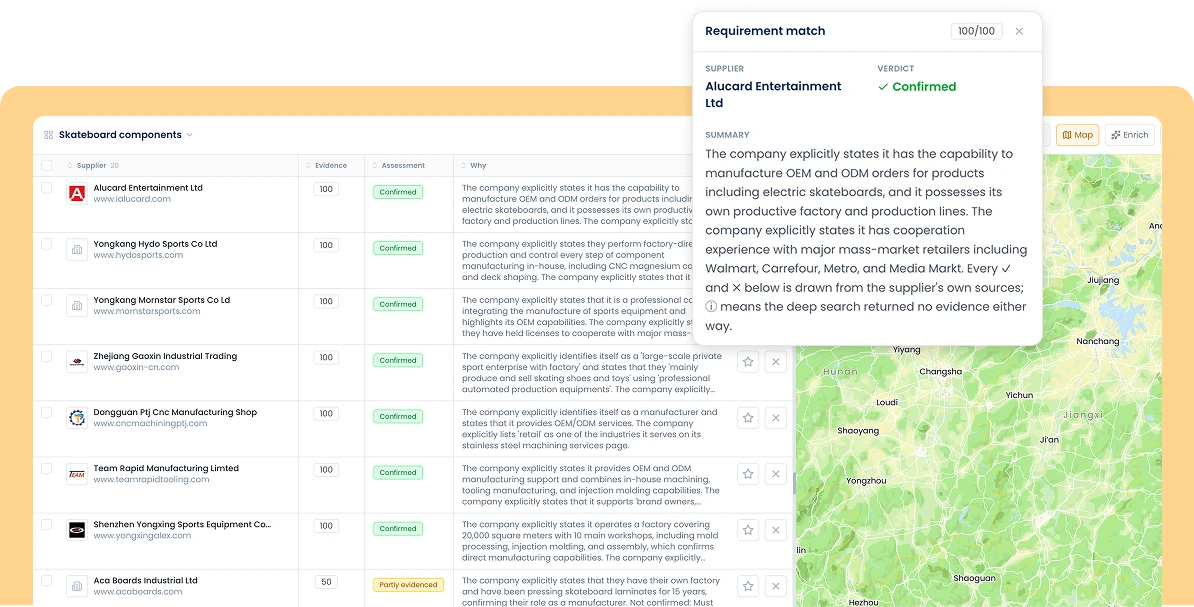
Every call writes into the project: requirements, candidates, verdicts, contacts and answers. Nothing lives only in a context window that is gone when the session ends.
Each verdict keeps the sentence, the link and the date it rests on. Whoever signs off the award can see why a company is on the list, months later, without re-running anything.
The next run in this category opens the brief, the candidates and the answers this one left. It starts from what is known and only searches for what has changed since.
Connect once and your agent gets the whole company layer: resolving a company, searching your own base before the market, reading the evidence behind every value, and handing the work to the next agent or person. These are the tools to reach for first.
Resolve a company and read the record we hold on it.
The sentence behind every value — quoted from the company’s own site, with its URL.
A brief goes in, scored candidates come out — from your own base and the whole market.
Who else looks like this company, and where a part is made.
The suppliers you already work with, searched before the market.
The case file one agent hands to the next — projects, the people at a supplier, and the mail.
Resolves a name or a domain onto the company records behind it. The domain is the reliable way in — a legal name often is not, and a subsidiary searched by name returns its parent.
Identity, capabilities, certifications, locations and the legal entities the record merges.
Brings a company out of the market index and into your own base.
Semantic search over a company’s own crawled site, up to 20 domains at once. Ranked passages, never a synthesized answer, with a live-web fallback when the index is stale.
The matches, joined by uuid. Every requirement verdict carries { url, quote, fragment } — the sentence the score was read from.
Turns a brief — and drawings or specs — into structured requirements: certifications, materials, technologies, industry, logistics, references, location.
The deep run across the full index. Start it from an extraction; re-attach to one in flight with its runUuid. Settles at status "done".
Structured keywords over your own supply base only, with the spend and categories you uploaded. The check to run before a market search.
Vector similarity from one company, narrowed by country, role or category.
Share and supplier count per country, with financial, geopolitical and logistics risk grades and price level. A sampled distribution, not a census.
Files candidates into longlist, shortlist or active. Idempotent — re-adding moves rather than duplicates.
The container a search, its candidates and its outreach all hang from.
The checklist each candidate answers. A constraint is accepted (they must confirm), rejected (they must deny) or answered (any response).
By uuid, email or exact name. Read-only unless you grant write.
A named person at a supplier, with role, department and country.
Field updates read out of incoming messages — a new number, a changed job title — waiting for a human to accept or dismiss.
Writes the suggested value. Not idempotent: a resolved suggestion cannot be applied twice.
Markdown body, attachments, threaded replies and optional scheduling. Picks a mailbox, or names one explicitly.
Per-recipient delivery state — sent, delivered, bounced — with the transport detail behind it.
A thread in order, oldest first, paged.
Reusable outreach a run can apply instead of composing every mail from scratch.
Your client signs in once in a browser and refreshes silently from then on.
{
  "mcpServers": {
    "matchory": {
      "type": "http",
      "url": "https://discovery.matchory.com/mcp"
    }
  }
}
Your client opens a browser for OAuth on first connect, then refreshes silently. Clients that only speak stdio can bridge with npx -y mcp-remote https://discovery.matchory.com/mcp.
ISO 27001 certified, GDPR compliant, EU-sovereign by default — Matchory clears the security and compliance bar your enterprise customers already expect.